Excel can turn a column of degrees, minutes and seconds into numbers a map can use. The easiest mistake to miss is a west or south angle whose degrees column contains a zero.
To convert GPS coordinates in Excel, put degrees, minutes, seconds and hemisphere in separate columns. Calculate degrees + minutes/60 + seconds/3600. Apply a negative sign for south or west. Keeping the hemisphere in its own field also preserves west and south angles smaller than one degree.
Set up one row per angle
Use column A for a row identifier, B for unsigned whole degrees, C for whole minutes, D for seconds, and E for the hemisphere letter. Put the result in F. Download the Excel practice workbook (.xlsx) to try the four control rows with the formula already in place. Here, NY-lat and NY-lon are the two angles of one point. The third record deliberately tests a westward angle whose degrees component is zero.
Arrange the source columns
| A · ID | B · Degrees | C · Minutes | D · Seconds | E · Hemisphere | Expected F |
|---|---|---|---|---|---|
| NY-lat | 40 | 41 | 21.12 | N | 40.6892 |
| NY-lon | 74 | 2 | 40.20 | W | −74.0445 |
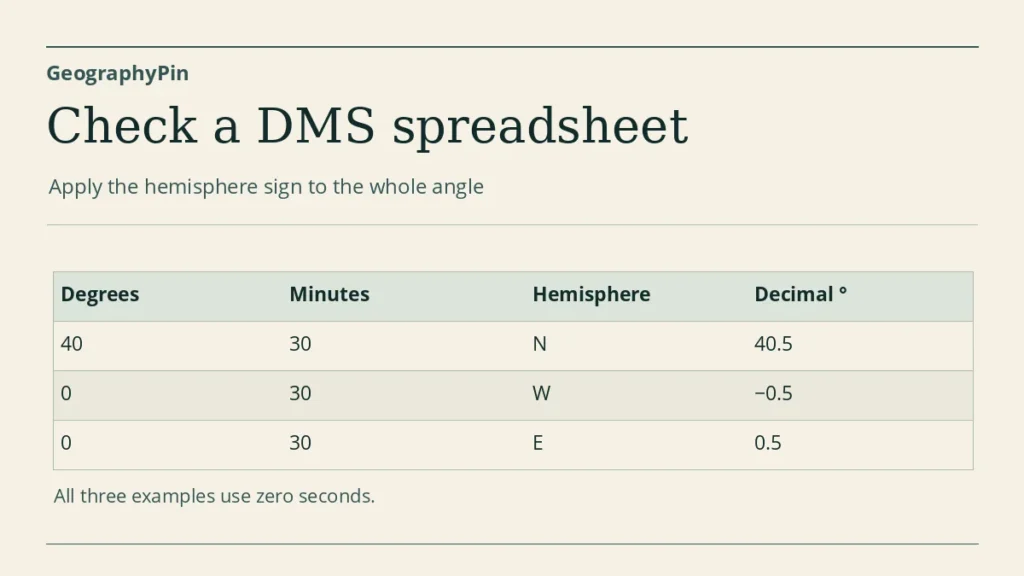
| West-test | 0 | 30 | 0 | W | −0.5 |
| Bad-minute | 17 | 60 | 0 | N | CHECK |
DMS to decimal degrees formula with hemisphere validation
Enter this formula in F2 and fill it down. It uses English function names and comma argument separators. For regional versions of Excel, use the function names and separator your installation expects.
Validate a west or south angle
=IFERROR(IF(AND(COUNT(B2:D2)=3,B2=INT(B2),C2=INT(C2),B2>=0,C2>=0,C2<60,D2>=0,D2<60,OR(E2="N",E2="S",E2="E",E2="W"),B2+C2/60+D2/3600<=IF(OR(E2="N",E2="S"),90,180)),IF(OR(E2="S",E2="W"),-1,1)*(B2+C2/60+D2/3600),"CHECK"),"CHECK")The first checks require three numeric components, whole degrees and minutes, and minutes and seconds below 60. The hemisphere sets the maximum angle and the sign. For example, 90°00′01″ N fails even though the degrees field alone looks valid. A blank result must not turn into a coordinate at zero.
Turn validated angles into map-ready columns
Keep the original DMS data. Make separate numeric latitude and longitude columns in a working sheet, using the record identifier to keep both angles together. Check that every latitude came from N or S and every longitude from E or W. A valid longitude in the latitude column is still the wrong field.
Preserve station IDs during CSV import
For CSV exchange, give the headings explicit names such as site_id,latitude,longitude. Store identifiers such as 0017 as text on import so Excel keeps their leading zeros. Spot-check one result with the coordinate converter before exporting the full sheet.
Convert a worksheet of complete coordinate pairs
If each row already describes a location, you can use the batch coordinate converter directly. Open the .xlsx workbook, select the worksheet that holds the locations and review the preview. Match the latitude and longitude columns by name, or select one column containing complete coordinate strings. Check a known row before converting the rest.
For example, a station ID of 0017 can sit beside 40.6892 and −74.0445. Export an Excel workbook to keep the station identifier with its result and retain a sheet of conversion errors. A source formula needs a saved value. If its value is missing, recalculate and save the source in Excel, then reopen the file in the converter. CSV and tab-separated files remain available for text-based workflows.
Know when a spreadsheet formula needs more information
If the input says 40°41.352′ N, you have decimal minutes and should divide 41.352 by 60. Do not put 0.352 into the seconds field. If the input is a UTM easting and northing or an MGRS string, recover the source zone and reference system and use a converter that understands that grid. See the parts of a UTM coordinate.
Frequently Asked Questions
Why did Excel drop the minus sign from −0°30′?
A numeric zero-degree field cannot carry a reliable west or south sign through ordinary spreadsheet calculations. Store the hemisphere in its own text field. The worked example returns −0.5.
Can I use this formula on one text string such as 40°41′21.12″N?
Split the string into the four documented fields first, or paste it into a converter that accepts DMS text. The formula deliberately flags missing or nonnumeric components.
Does formatting the result to two decimal places change the raw number?
Excel’s usual number formatting changes the displayed value. A separate rounding formula changes the computed value. Keep the underlying precision you need when you export.
What Did We Learn Today?
Preserve hemisphere and row identifiers, validate each angle, and check the delivery format. A west-of-zero test and one intentionally bad row show whether the spreadsheet handles signs and errors before a larger import.
Sources & Data Notes
View sources and data notes
The examples and validation formula are original. The example uses ordinary WGS 84 angular coordinates and makes no change of datum.